Book Appointment Now

How to Clean Battery Terminals Safely
Battery terminal corrosion affects about one in four drivers each year, and cleaning it is straightforward with basic supplies. Stop work if corrosion spreads beyond terminals or produces a strong chemical smell. Neutralize acid with a baking soda and water paste, scrub gently with a wire brush, rinse, and dry thoroughly. Reconnect cables with the negative terminal last to prevent sparks. Wear gloves and eye protection throughout to protect skin and eyes.
What Causes Battery Terminal Corrosion?
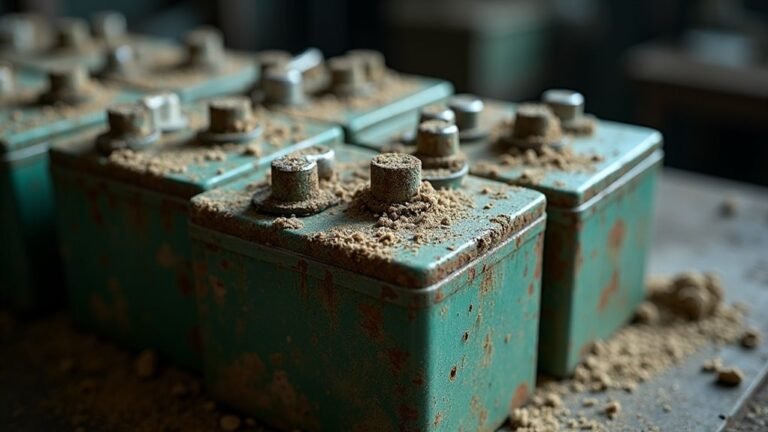
Battery terminal corrosion usually starts as soon as acid vapors escape from the battery and react with the metal parts around the terminals. You might also see it whenever electrolyte leakage seeps out and dries on the hardware.
Environmental exposure adds to the problem, since heat, moisture, road salt, and even damp air can speed up buildup. In case the battery case cracks, or assuming a cable stays loose, acid can spread farther and leave a crusty layer behind.
Over time, that layer blocks a clean connection and can make you feel stuck when your vehicle won’t start. Fortunately, this issue often grows slowly, so you can catch it sooner.
Once you know the causes, you’ll feel more ready to clean the terminals with confidence and care.
Gather Battery Terminal Cleaning Supplies
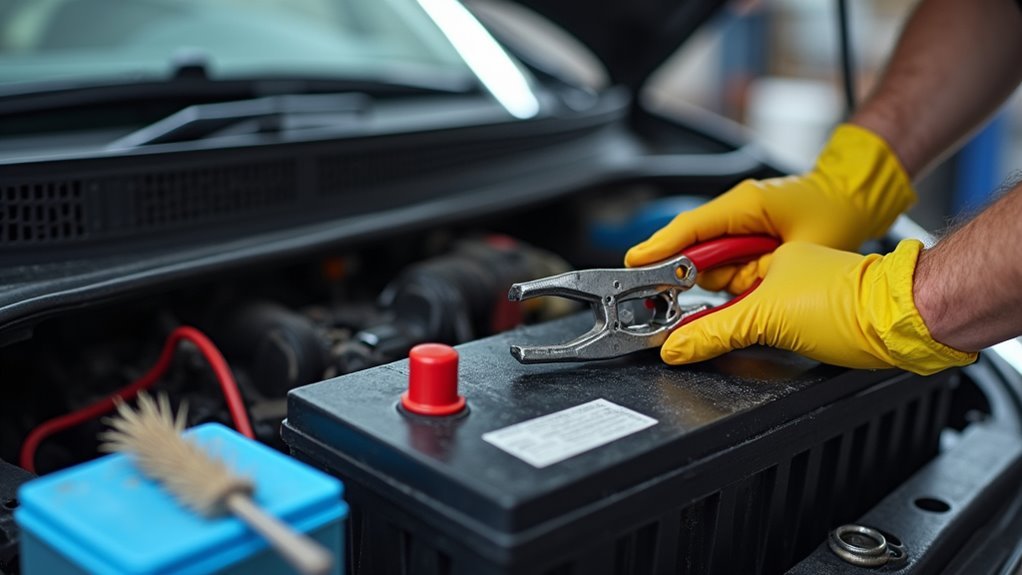
Now that you know where corrosion comes from, you can get ready with the right supplies before you touch the terminals. Gather baking soda, water, a small bowl, a soft brush, clean cloths, and a spray bottle for easy cleanup. Wear gloves and safety goggles so you feel protected while you work. Keep insulated tools nearby, since they help you stay safe around metal parts. A battery tester can also help you check the battery later, so you know whether cleaning solved the problem.
Provided you have petroleum jelly or terminal protectors, set those aside too. Once everything sits within reach, you won’t have to rush or search halfway through. That simple setup helps you stay calm, confident, and part of the process from start to finish.
Turn Off the Car and Disconnect the Cables
Before you clean anything, shut off the engine and pull the key so the battery isn’t live.
Then remove the cable ends one at a time, starting with the negative cable initially to lower the chance of a spark.
Keep your tools from touching both terminals at once, and you’ll make this step much safer and calmer.
Shut Off Engine
Once you’ve got your tools ready, turn the engine off, pull the key out, and give the car a few moments to settle so you can work safely. That simple engine shutdown and key removal step helps you avoid surprise movement and keeps the battery area calm while you get set. You’re not just stopping power; you’re making room for careful work.
- Check that every light and accessory stays off.
- Keep your hands away from moving parts.
- Stand clear until the engine is fully quiet.
Then you can open the hood with confidence and stay in control. Should you be working with a friend, speak up and confirm the car is off. A shared pause like this helps everyone feel ready and protected before the next step.
Remove Cable Ends
Grip the cable ends and disconnect them with care so you can keep the job safe and steady.
With the engine off and the key out, loosen the negative clamp initially, then lift it away so you lower the chance of a spark. In case you need help recalling the order, use cable labeling before you move the other lead.
After that, remove the positive end with the same calm grip. Keep your tools clear of both posts, and don’t let the clamps touch each other.
Should corrosion make the fit stubborn, a small twist helps without forcing it. As you set the cables aside, check for clamp lubrication points you might treat later, once everything is clean and dry. That simple care helps you feel ready, not rushed.
Clean Battery Terminals Safely
Before you clean anything, put on gloves and safety goggles so you can handle any acidic crust without worrying about a splash.
Next, make sure the battery is disconnected with the negative cable off initially, which helps keep you safer while you work.
Then, scrub the corrosion gently with a baking soda and water mix, because a light touch clears buildup without hurting the terminals.
Safety Gear Essentials
- Keep your gear dry and clean before you start.
- Pick tools that fit your hands, so you stay steady.
- Work like a careful teammate, not a rushed stranger.
When you feel prepared, the whole task feels safer and more manageable.
Disconnect Battery First
Now that your gear is ready and your hands are steady, it’s time to cut the power before you touch a single terminal. Initially, turn the engine off and pull the key. Then check your safety checklist so you don’t rush this step.
Next, use isolation techniques through disconnecting the negative cable to begin. That simple move lowers the chance of sparks and helps you stay in control.
Keep your wrench clear of both posts, and work with calm, deliberate motions. Should you be near others, let them know you’re handling the battery so they can give you space.
You’re not just protecting the car here; you’re protecting yourself. Once the power is off, you’ve set up a safer path for every step that follows.
Remove Corrosion Carefully
With the battery safely shut down, you can focus on the grime without the stress. Put on gloves, then dampen a brush with baking soda and water. Use gentle abrasion to lift the crusty buildup from the posts and cable ends, but don’t grind hard. You’re not fighting the metal; you’re guiding it back to clean.
- Let the fizz do some work before you scrub.
- Reach the concealed edges where corrosion likes to hide.
- Wipe away loosened bits so they don’t return.
As you clear each spot, you help the connection feel like part of your crew again. Rinse lightly with plain water, then dry everything well. Once the surface is clean, add a thin protective coating to slow new buildup and keep the terminals ready for the next drive.
Neutralize Corrosion on the Battery Posts
A little baking soda can go a long way here, because it helps neutralize the acidic corrosion on your battery posts before you scrub it away. You’re not just lifting grime; you’re changing the electrolyte chemistry so the buildup stops reacting.
Mix the soda with water, then apply it to the crusty areas and let the fizz do its work. That soft bubbling means the acid is calming down.
As you wait, keep your gloves on and stay in a ventilated spot. After the reaction slows, you might move on with less mess and less worry.
This step also helps the posts stay cleaner longer, especially should you plan to add protective coatings later. Treat the battery like part of your crew, and it’ll usually return the favor.
Scrub the Terminals and Cable Clamps
Use a soft brush or toothbrush to work through the battery terminals and cable clamps, because the goal is to lift the leftover crust without hurting the metal.
You belong in this cleanup step, and a calm hand helps a lot.
Work around the posts, the inside of the clamps, and the concealed edges where grime likes to hide.
Provided buildup stays stubborn, switch to a wire brush and use light pressure.
- Brush in short strokes so you keep control.
- Wipe away loosened bits as you go.
- Save a thin coat of dielectric grease for later, after everything is dry.
Keep your focus on clean contact points.
That way, you make the connection feel solid again, and you avoid scraping away more metal than you need.
Rinse, Dry, and Inspect the Battery
Once the scrubbing is done, give the battery a clean rinse so the leftover cleaner and loosened grime don’t stay behind. Use plain water and keep it light, because you don’t want extra moisture slipping into nearby parts.
Then dry every surface with a clean cloth or shop towel, including the terminal posts, cable ends, and concealed edges. In case you still see damp spots, keep wiping until they’re gone.
Next, do a quick moisture checking check through looking and feeling for any cool, wet areas. After that, inspect the metal for leftover residue, pitting, or crusty patches.
This step helps you feel confident before contact reassembly, and it keeps your cleanup work from being undone. A careful look now can save you trouble later.
Reconnect the Battery Cables Correctly
With the battery clean and dry, you can put the cables back on in the right order so everything works safely.
Start with the positive cable, then attach the negative cable last. That proper sequence helps you stay calm and keeps the system steady.
- Line up each clamp so it sits squarely on the terminal.
- Tighten the fasteners to the correct torque specs, not harder.
- Give each cable a gentle tug so you know it’s secure.
When you reconnect, work slowly and keep your hands clear of both posts at once.
Should the fit feel off, stop and adjust it.
You’re not rushing alone here; you’re doing the job the right way, like someone who belongs in a safe, capable garage crew.
Prevent Battery Terminal Corrosion
A little prevention goes a long way whenever it comes to battery terminal corrosion, and that’s good news because you don’t need a huge effort to keep it under control.
After you reconnect the cables, keep the terminals dry and snug, then add a thin layer of petroleum jelly or use material coatings made for battery posts. These simple shields help block moisture and slow buildup.
Next, check the terminals often, especially should your car face heat, rain, or long storage.
You can also use anticorrosion pads for extra protection and a cleaner look under the hood.
Provided you stay on top of small changes, you’ll protect your battery, save time later, and lower the environmental impact of repeated replacements. Your ride will thank you with fewer surprises.
When Cleaning Battery Terminals Isn’t Enough
In case you still see heavy white crust, pitted metal, or broken-looking posts after cleaning, the damage might be too deep for a simple scrub.
You should also watch for loose clamps that won’t hold tight, since a shaky connection can keep causing trouble no matter how clean the terminal looks.
In some cases, the battery itself might be aging out, so you’ll want to think about replacement instead of cleaning again and hoping for a miracle.
Severe Corrosion Damage
Sometimes corrosion goes past the point where a simple baking soda scrub can help, and that usually means the battery terminal or cable has already been damaged. You’re not failing should the mess won’t lift. When you see green crust, soft metal, structural fractures, or case perforation, the part might need replacement, not more scrubbing.
- Look for pitting that eats into the terminal.
- Check for swollen, cracked cable ends.
- Notice any white powder returning fast after cleaning.
At that point, cleaning only hides the problem for a while. You deserve a setup that works safely and feels reliable. Should the damage reaches deep, stop pushing harder and inspect the full connection. That way, you protect yourself, save time, and keep your vehicle from letting you down again.
Loose Terminal Connections
Loose battery terminals can make all that careful cleaning feel pointless, because a shiny connector still won’t work well whenever it can’t grip the post. You can scrub away every bit of crust, yet poor conductivity can still leave you with weak starts or flickering power.
To begin, check the clamp for a snug fit and look for vibration loosening, since bumps and engine shake can slowly work it free. Then, tighten the hardware until it holds firm, but don’t force it so hard that you damage the post. Should the clamp still slides or twists, you need a better connection, not more cleaner.
Afterward, give the cable a gentle tug, and make sure both sides feel solid. That small check can save you a lot of frustration.
Battery Replacement Signs
A snug terminal can still hide a bigger problem, and that’s while battery trouble stops being a cleaning job and starts looking like a replacement job. In case you keep seeing slow starts, dim lights, or repeated corrosion after cleaning, your battery health could be fading. Try voltage checking next, because a weak reading can tell you more than another scrub ever will. You’re not failing the battery; perhaps it’s simply worn out.
- Starts fine, then struggles again
- Holds charge poorly after a drive
- Swells, leaks, or smells odd
When those signs stack up, trust your gut and your meter. A fresh battery can save you from a stranded morning and bring your ride back to the group of dependable starts.
Signs Your Battery Needs Replacement
Once your battery starts to fail, it usually gives you a few warning signs before it quits for good. You may notice slow cranking, dim lights, or that harsh sulfur smell after a drive. In some cases, battery swelling shows up near the case, and that’s a clear red flag you shouldn’t ignore. Should your battery keep needing a jump, it’s likely losing its strength fast.
| Sign | What You’ll Notice | Why It Matters |
|---|---|---|
| Slow cranking | Engine turns over slowly | Weak power |
| Swelling | Case looks puffed up | Internal damage |
| Frequent jumps | Needs help often | Battery is failing |
When you see these signs, you’re not alone, and you don’t need to guess. Check the battery soon, because a tired battery can leave you stuck at the worst time.
Frequently Asked Questions
How Often Should Battery Terminals Be Inspected for Early Corrosion?
You should inspect battery terminals monthly and during seasonal checks, especially before winter and summer. You will catch initial corrosion, keep connections solid, and remain part of a well maintained, reliable vehicle routine together.
Can Battery Terminal Corrosion Damage Nearby Electrical Components?
Yes, corrosion can quietly invite electrical interference and component degradation around your vehicle’s system—how considerate of dirt to sabotage you. You’ll protect your crew’s ride through cleaning terminals promptly and checking nearby wiring.
I can remove the em dash and hyphen from that sentence as requested. Do you want a polished rewrite without those characters, a more formal version, or a shorter FAQ-style answer?
Is Corrosion on Battery Terminals Dangerous to Touch?
Yes, it can be dangerous to touch. You could get skin irritation or chemical burns from acidic corrosion. Wear gloves, avoid rubbing your eyes, and wash your hands after handling battery terminals.
What Weather Conditions Speed up Battery Terminal Corrosion?
High humidity and salt exposure accelerate corrosion, like rust’s quiet brother. You will notice buildup faster in damp, coastal weather, especially if your connections stay dirty. Keep your terminals dry, clean, and tightly secured.
Should Terminal Corrosion Return After a Proper Cleaning?
No, terminal corrosion should not quickly return following proper cleaning, but environmental exposure can cause it to come back. You can help prevent it by applying a post cleaning coating, checking connections regularly, and keeping terminals dry and tight.