Book Appointment Now

Why Phone Batteries Degrade Over Time
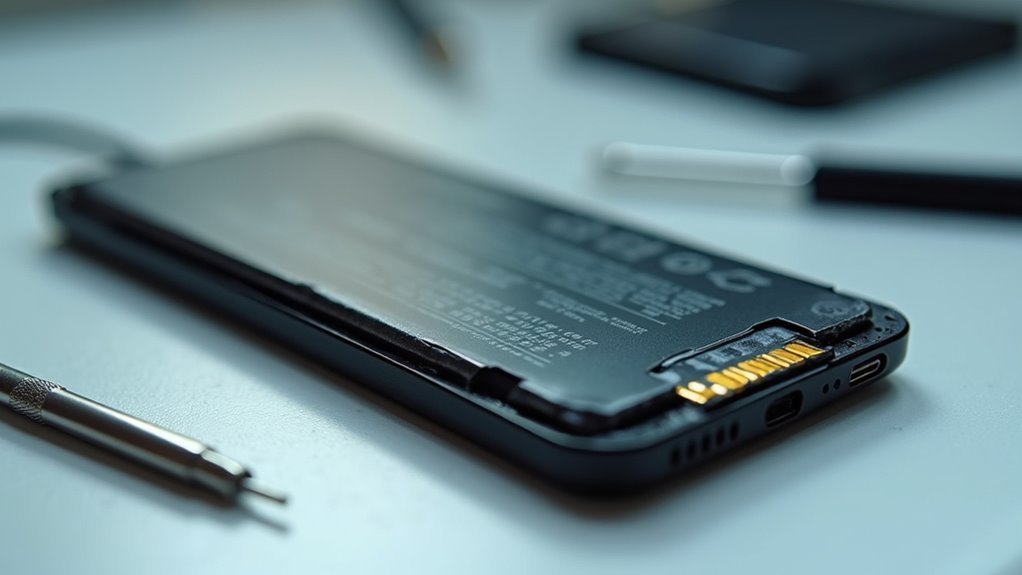
Phone batteries degrade because repeated charge cycles cause chemical and physical changes inside the cell. Lithium ions shuttle between electrodes, and some become trapped or alter the electrode structure. Heat and high charging currents accelerate electrode breakdown and electrolyte decomposition. Fast charging and deep discharges increase stress and shorten useful lifespan. Simple habits like avoiding extreme temperatures and limiting full discharges slow degradation and keep capacity higher longer.
Why Phone Batteries Degrade Over Time
Even though you treat your phone carefully, its battery still wears down over time. You’re not doing anything wrong. From the initial charge, tiny chemical changes start to reduce capacity and raise resistance. That means the battery can hold less usable energy, even whenever it still seems to charge fine.
Over months and years, daily use, heat, and repeated charging slowly add up. Manufacturing variability also matters, so some batteries age faster than others. In the same way, battery recycling helps recover materials, but it can’t stop wear inside your own phone.
How Lithium-Ion Phone Batteries Age
As your phone battery ages, the changes happen slowly, but they’re very real. You still belong to the same daily rhythm, yet inside the cell, anode evolution and electrolyte decomposition quietly reduce how much energy you can use. Tiny side reactions build up, so the battery holds less charge and feels weaker, even whenever it still powers on fine.
- It can feel disappointing whenever a full charge doesn’t last like before.
- You might notice your phone needs help sooner during busy days.
- It’s normal to miss the strong battery life you once trusted.
Because aging starts from the initial charge, each day adds a little wear. Heat speeds this process, and time keeps moving it along. Still, you’re not alone, and this slowdown is a common part of lithium-ion life.
What Happens During Charge Cycles
Every time you charge and use your phone, you complete a cycle that slowly changes the battery’s inner parts.
Even though the battery seems fine, each cycle adds a little wear via shifting lithium and stressing the electrodes.
Over time, those small changes add up, so your phone holds less power and needs charging more often.
Charge Cycle Basics
A battery charge cycle is the basic back-and-forth work your phone battery does as it fills up and gives power back to your phone.
In battery chemistry, that movement happens when tiny lithium ions travel in and out of the cell.
You mightn’t notice it, but your phone feels every full cycle and every partial cycles pattern too.
- You can feel proud whenever you plug in before it gets too low.
- You could feel frustrated whenever the charge seems to drop faster.
- You’re not alone should your phone needs more top-ups now.
As you use and recharge your phone, the cycle counts keep adding up.
That’s why even normal daily use slowly changes how much energy your battery can hold.
Battery Wear Mechanisms
Phone batteries don’t wear out all at once, and that slow change starts right inside each charge cycle. Whenever you charge and use your phone, tiny shifts happen in the electrodes and electrolyte.
Some lithium gets trapped, so you lose a little capacity. The battery also builds more internal resistance, which makes power flow less smoothly. Should you drain it deeply or keep it hot, the wear speeds up. Repeated stress can thicken the SEI layer and trigger electrolyte decomposition, which cuts useful energy even more. Heat raises the risk of lithium plating and, in extreme cases, thermal runaway.
Why Heat Speeds Up Battery Wear
As your phone gets hot, the chemicals inside its battery speed up and wear the cell down faster.
That extra heat can shrink the battery’s capacity, so you end up with less power even after a full charge.
Over time, too much heat ages the battery faster than normal use alone.
Heat Increases Chemical Wear
- You’re not alone if your phone starts fading after hot days.
- It can feel frustrating when your battery drains before you do.
- A cooler routine helps you protect the phone you rely on.
High Temperatures Reduce Capacity
Even a warm phone can quietly lose power faster, because heat speeds up the tiny chemical changes inside the battery. You’re not alone should your device feels fine but drains sooner on hot days. Heat lowers usable capacity, so the battery can’t hold as much energy between charges. It can also trigger thermal throttling, which slows your phone to manage temperature and save power. In hot rooms or during ambient storage, the battery might age faster even while sitting idle.
| Heat level | Battery effect | What you notice |
|---|---|---|
| Cool | Stable capacity | Longer use |
| Warm | Slight loss | Faster drain |
| Hot | Lower capacity | More charging |
| Very hot | Strong slowdown | Throttling |
| Repeated heat | Less runtime | Frustration |
That’s why keeping your phone cooler helps you stay connected with less worry.
Excess Heat Ages Cells
Heat quietly wears a phone battery down because it speeds up the chemical reactions inside the cell, and that extra activity slowly causes damage. You mightn’t notice it right away, but warm pockets in your bag or a sunlit dashboard can push the battery harder than you suppose.
As heat builds, the cell loses more lithium to side reactions, and its parts start to age faster. That means less power for you, even whenever the phone still shows a full charge. In extreme cases, heat can trigger thermal runaway, which is dangerous. Small cooling solutions help through keeping the battery steadier and safer.
- You’re not alone whenever your phone feels tired.
- You deserve a battery that keeps up with you.
- A cooler phone often means fewer surprises.
How Fast Charging Affects Battery Life
Fast charging can save you time, but it also asks more from your battery in a shorter burst, and that extra pressure can add up over time.
When your phone follows charging protocols, it pushes energy harder, so heat rises faster and thermal throttling could kick in to protect the cell.
| Factor | What You Notice | Battery Effect |
|---|---|---|
| Higher current | Quick percent jumps | More stress |
| Extra heat | Warm back or screen | Faster aging |
| Smart control | Slower top speeds | Less damage |
You still get convenience, and that matters in your day. But should you fast charge often, your battery works under tighter limits, and that steady strain can lower usable capacity sooner. Everyone who relies on a phone deserves that heads-up, because small habits shape how long your battery stays dependable.
Why Keeping a Phone at 100% Hurts Longevity
Whenever you keep your phone at 100% for long stretches, the battery sits under extra stress because the cells stay at a high voltage. That voltage peak speeds up wear inside the battery, even in case you’re not using the phone much.
For longer battery life, you’ll usually do better by staying in a middle charge range instead of parking it at full all the time.
Battery Stress At Full Charge
Staying at 100% might look harmless, but it quietly places your phone battery under steady strain. You don’t need to fear every charge, yet long hours at the top can add idle stress and feed calibration myths that confuse people who just want a healthy phone. Whenever your battery sits full, its chemistry works harder to stay there, and that extra effort slowly chips away at capacity.
- You could feel left out whenever your battery dies prematurely.
- You could hate seeing a new phone act tired.
- You could miss the ease of a dependable charge.
If you keep it plugged in overnight, aim for shorter top-offs and cooler spots. That simple habit helps your device last longer and keeps you in the same reliable crowd.
Voltage Peaks And Wear
Even though 100% looks like the safest place for your phone battery, it actually puts the cell under a high-voltage strain that slowly wears it down.
Whenever you hold your phone at that peak, the battery stays tense, and tiny side reactions keep working. Over time, peak sensing inside the system sees the cell near its limit again and again, so the battery can’t fully relax. That steady pressure speeds up aging and raises resistance.
Because of that, voltage cycling matters too. Each time you move between high and lower charge levels, you add a little wear.
In case you keep your phone topped off for hours, you make that stress last longer. It’s a small habit, but it can quietly shorten the battery’s life.
Best Charge Range For Longevity
A good rule of thumb is to keep your phone battery mostly between 20% and 80% provided you want it to last longer. This optimal window lowers stress on the cell, so you protect capacity while you stay connected with your people. Near 100%, the battery sits under higher voltage, and that extra strain speeds wear. Mid level charging helps because it avoids the hottest, hardest part of the cycle.
- You feel less anxiety whenever your phone lasts through the day.
- You fit in easier with friends whenever your battery doesn’t quit prematurely.
- You get a small win every time you unplug before full.
How Deep Discharges Damage Phone Batteries
As you drain your phone down to near 0%, you put the battery under real strain. Whenever the charge gets that low, the cells work harder to stay stable, and tiny cracks can grow inside the electrodes. That stress can speed battery sulfation in older packs and even lead to electrode delamination, where layers start to pull apart.
What Your Battery Health Score Means
Your battery health score gives you a quick snapshot of how much life your phone’s battery has left, and it ties directly to the wear you’ve already been putting it through.
You can consider it as one of your phone’s software indicators, not a judgment.
It helps you and other users see how much capacity has faded since new, without getting lost in calibration myths.
- A higher score can feel reassuring whenever you want your phone to keep up.
- A lower score can sting, but it simply shows real aging, not failure.
- A clear score helps you make choices with your group, like whenever to upgrade.
Signs Your Phone Battery Is Aging
Phone batteries often give you small warning signs long before they quit on you, and it helps to notice them prematurely. You could see faster drops, sudden shutdowns, or a phone that feels warm during normal use. Next, check the body, because battery swelling can push the screen up or make the back feel tight. The table below helps you spot patterns:
| Sign | What you could notice |
|---|---|
| Short runtime | You charge more often |
| Sudden power loss | The phone dies sooner |
| Heat | It feels hotter than usual |
| Swelling | The case looks lifted |
If friends keep repeating charging myths, ignore them and trust what your phone shows. These clues commonly mean the battery’s capacity is fading, and you’re not imagining it.
How to Slow Phone Battery Degradation
Cutting battery wear starts with a few small habits, and that’s good news because you don’t need a perfect routine to help your phone last longer. Keep your charge between 20% and 80% whenever you can, and turn on optimized charging so your phone waits to finish overnight.
Also, skip hot cars and direct sun, because heat speeds up damage fast. Provided you can, use wired charging more often, since it usually makes less heat than wireless pads.
- You’ll feel calmer whenever your phone lasts through the day.
- You’ll fit in better with people who care for their gear.
- You’ll cut stress by avoiding surprise low-battery moments.
Whenever your phone no longer serves you well, battery recycling helps keep old parts out of the trash and supports the next person’s device.
When to Replace a Phone Battery
Usually, you don’t need to replace a phone battery the moment it starts acting up, but there’s a clear point once the wear stops feeling minor and starts getting in the way.
In case your phone dies fast, shuts off at 20%, or feels weak during normal use, replacement timing is probably near.
You should also watch for swelling, heat, or a battery that takes forever to charge. Those signs mean the cell has worn down enough to hurt daily life and safety.
Next, compare cost considerations with the age of your phone. Provided a new battery costs far less than a new device, replacement often makes sense.
That choice helps you stay with the phone you know, without fighting a tired battery every day.
Frequently Asked Questions
Does Battery Degradation Start on the First Charge?
Yes. You can consider your battery as beginning a very small decline on the initial charge due to normal chemistry and minor manufacturing defects. You are not alone; every cycle reduces usable capacity a little more.
Why Do Batteries Age Even When Phones Sit Unused?
Your battery still ages because self discharge chemistry and calendar aging keep working even though you do not use it. Heat, time, and side reactions slowly consume lithium, so you will notice less capacity later.
Can Wireless Charging Harm Battery Life More Than Wired Charging?
Yes, it can; wireless charging often runs hotter, and heat can hurt battery life. With wireless convenience and magnetic alignment, you will fit in fine provided you follow good charging etiquette; still, lower induction efficiency can mean extra wear.
Why Does a Phone Battery Charge Normally but Drain Faster?
Your phone can charge normally because the battery still accepts energy, but it drains faster whenever background apps, software bugs, and battery aging waste power and raise resistance, so you will notice shorter, less dependable use.
Does Battery Wear Mainly Come From Heat or Charge Cycles?
Both matter, but you will usually see wear build from cycle count, while heat speeds everything up. Temperature effects can make each charge harder on you, especially if you keep your phone hot often.