Book Appointment Now

5 Best Battery For Mackbook Air 11 in 2026
You want a battery that fits exactly but you also don’t want to gamble with safety or cycle life. You’ll need packs that match A1370/A1406/A1465 specs, correct voltage and polarity, and verified connectors, plus UL/IEC 62133 and CE/RoHS protections. I’ll outline five top options that meet those criteria and explain what to check so you don’t end up with a short-lived or unsafe replacement—keep going to see which ones make the cut.
| MacBook Air 11″ Replacement Battery A1370/A1465 |

| Most Reliable | Compatible Models: MacBook Air 11″ A1465 (Mid 2012–Early 2015), A1370 (Mid 2011) — not 2010 A1370/A1375 | Voltage: 7.3 V | Energy/Capacity: 35 Wh / 4680 mAh | VIEW LATEST PRICE | Read Our Analysis |
| MacBook Air 11″ Replacement Battery A1465/A1406 |
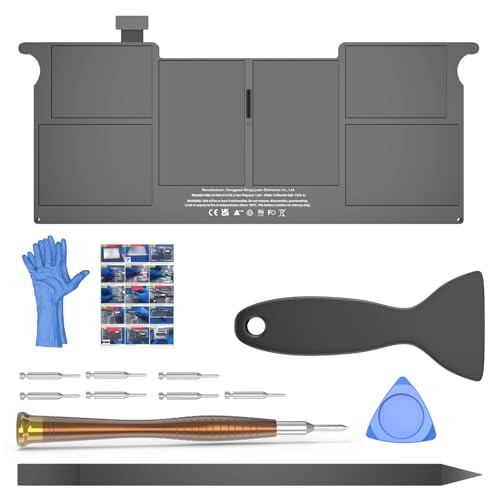
| Best Capacity | Compatible Models: MacBook Air 11″ A1370 (Mid 2011), A1465 (Mid 2012–Early 2015) | Voltage: 7.6 V (listed) | Energy/Capacity: 39 Wh / 5100 mAh | VIEW LATEST PRICE | Read Our Analysis |
| MacBook Air 11″ Replacement Battery (A1406/A1370) |
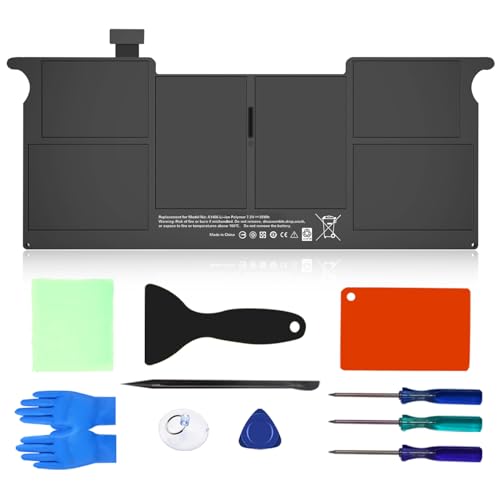
| Longest Lifespan | Compatible Models: MacBook Air 11″ A1465 (Mid 2012–Early 2015), A1370 (Mid 2011) — not 2010 A1370 | Voltage: 7.3 V | Energy/Capacity: 35 Wh / 4680 mAh | VIEW LATEST PRICE | Read Our Analysis |
| BatPower A1406 Replacement Battery for MacBook Air 11 |
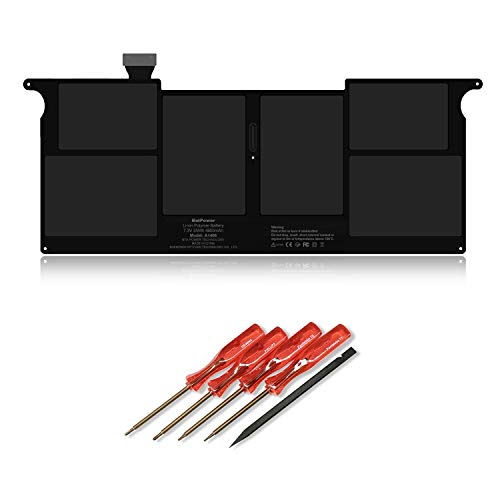
| Complete Kit | Compatible Models: MacBook Air 11″ A1370 (Mid 2011) | Voltage: 7.3 V | Energy/Capacity: 35 Wh / 4800 mAh | VIEW LATEST PRICE | Read Our Analysis |
| BatPower Replacement Battery for MacBook Air 11″ A1375 |

| Legacy Model | Compatible Models: MacBook Air 11″ A1370 (Late 2010) — A1375 designation | Voltage: 7.3 V | Energy/Capacity: 35 Wh / 4800 mAh | VIEW LATEST PRICE | Read Our Analysis |
More Details on Our Top Picks
MacBook Air 11″ Replacement Battery A1370/A1465
Should you need a direct, high-capacity replacement for an 11″ MacBook Air (Mid 2011–Early 2015), the A1406/A1465 battery is a solid pick—it’s designed specifically for A1370 and A1465 models and delivers 4680 mAh (35 Wh) at 7.3 V, so you’ll get near-original runtime and more than 1,000 recharge cycles without fuss. You’ll swap it into Mid 2011–Early 2015 11″ Airs (EMC 2471, 2558, 2631, 2924) but not 2010 A1370/A1375 units. The Li‑Polymer pack includes over‑charge/discharge protection, multi‑chip regulation, CE/FCC/UL/RoHS certifications, a 12‑month replacement warranty, and 24‑hour email support.
- Compatible Models:MacBook Air 11″ A1465 (Mid 2012–Early 2015), A1370 (Mid 2011) — not 2010 A1370/A1375
- Voltage:7.3 V
- Energy/Capacity:35 Wh / 4680 mAh
- Battery Type / Chemistry:Li-Polymer (Li‑Po)
- Safety Certifications:CE, FCC, RoHS, UL
- Warranty / Support:30-day refund, 12-month replacement; 24‑hour email support
- Additional Feature:Enhanced circuit board
- Additional Feature:Over-charge protection
- Additional Feature:30-day refund
MacBook Air 11″ Replacement Battery A1465/A1406
Should you rely on a Mid‑2011 to Initial‑2015 11‑inch MacBook Air and need a direct, high‑capacity swap, the A1465/A1406 replacement battery delivers the 7.6V/39Wh (5100mAh) capacity and circuit protections you expect from OEM‑standard parts. It fits MacBookAir4,1 through MacBookAir7,1 (A1370/A1465 models) and matches EMC 2471/2558/2631 and example part numbers like MC968LL/A. You’ll get fast‑charge support, overcharge and over‑discharge protection, UL/CE/FCC/RoHS certifications, and an expected 1000+ cycle life. Verify compatibility via the case, About This Mac, System Report, or original battery. Support includes 24/7 email, 60‑day refunds, 90‑day replacements, and a maintenance guide.
- Compatible Models:MacBook Air 11″ A1370 (Mid 2011), A1465 (Mid 2012–Early 2015)
- Voltage:7.6 V (listed)
- Energy/Capacity:39 Wh / 5100 mAh
- Battery Type / Chemistry:(OEM standard) lithium battery (implied Li‑ion/Li‑polymer)
- Safety Certifications:UL, CE, FCC, RoHS
- Warranty / Support:60-day refund, 90-day replacement; 24/7 email support; maintenance guide
- Additional Feature:Fast-charging support
- Additional Feature:OEM manufacturing standards
- Additional Feature:60-day refund
MacBook Air 11″ Replacement Battery (A1406/A1370)
Should you require a direct, high-capacity replacement for an 11″ MacBook Air (A1465 or A1370), this A1406/A1370 battery delivers a dependable 35 Wh (4680 mAh) Li‑ion pack with improved circuitry for stable current and low self‑discharge—ideal for users who want a like‑for‑like swap that lasts through many charge cycles and comes with certifications and 12‑month support. You’ll get a 7.3V black battery compatible with A1465 (Mid 2012–Early 2015) and A1370 (Mid 2011) models; notice it isn’t for the 2010 A1370. It’s UL/CE/FCC/RoHS/PSE certified, tested per unit, claims >98% cobalt, and includes global export plus installation guidance.
- Compatible Models:MacBook Air 11″ A1465 (Mid 2012–Early 2015), A1370 (Mid 2011) — not 2010 A1370
- Voltage:7.3 V
- Energy/Capacity:35 Wh / 4680 mAh
- Battery Type / Chemistry:Li‑ion
- Safety Certifications:UL, CE, FCC, RoHS, PSE
- Warranty / Support:12 months after-sales service; professional installation guidance
- Additional Feature:Upgrade current chip
- Additional Feature:Cobalt proportion >98%
- Additional Feature:Worldwide export
BatPower A1406 Replacement Battery for MacBook Air 11
Should you need a drop-in replacement for a 2011 MacBook Air 11″ (A1370/EMC 2471), the BatPower A1406 is a straightforward choice—it’s built to match Apple’s A1406 spec with 7.3V, 4800mAh (35Wh) capacity so you’ll get similar runtime and compatibility with MC968/MC969 model variants. You install it after verifying the model number on the laptop’s back case and confirming the existing battery model. The kit includes the A1406 battery, an S2 stainless steel screwdriver, a helper stick, and a manual. BatPower backs it with 18 months warranty and customer support should you require assistance.
- Compatible Models:MacBook Air 11″ A1370 (Mid 2011)
- Voltage:7.3 V
- Energy/Capacity:35 Wh / 4800 mAh
- Battery Type / Chemistry:(Replacement A1406) implied Li‑ion/Li‑polymer
- Safety Certifications:(Warranty product) certifications not explicitly listed but marketed as replacement A1406 (seller provides warranty)
- Warranty / Support:18-month warranty; customer service
- Additional Feature:Includes screwdriver kit
- Additional Feature:S2 stainless steel tools
- Additional Feature:18-month warranty
BatPower Replacement Battery for MacBook Air 11″ A1375
Should you own a late-2010 MacBook Air 11″ (A1370, EMC 2393), the BatPower A1375 replacement battery gives you a direct-fit, 35Wh (4800mAh) option that restores original runtime while including a screwdriver kit and manual for easy installation. You’ll get the 7.3V A1375 battery compatible with MC505/MC506 and related model numbers; it only fits the 11-inch A1370 Late 2010, so verify the model on your laptop’s back case and existing battery initially. The package includes an S2 stainless steel screwdriver kit, helper stick, and manual, plus free 18-month warranty and customer support.
- Compatible Models:MacBook Air 11″ A1370 (Late 2010) — A1375 designation
- Voltage:7.3 V
- Energy/Capacity:35 Wh / 4800 mAh
- Battery Type / Chemistry:(A1375) implied Li‑ion/Li‑polymer
- Safety Certifications:(Warranty product) certifications not explicitly listed but sold with warranty (common marketplace practice)
- Warranty / Support:18-month warranty; customer service
- Additional Feature:Fits Late 2010 model
- Additional Feature:Includes helper stick
- Additional Feature:Free 18-month warranty
Factors to Consider When Choosing Battery For Mackbook Air 11
Whenever choosing a replacement battery for your MacBook Air 11, you’ll want to check compatibility with your exact model and connector. Compare capacity (mAh) and expected runtime, confirm voltage and battery chemistry, and look for a high cycle life to guarantee longevity. Finally, make certain the battery has proper safety certifications to protect your laptop and yourself.
Battery Compatibility Check
Because a MacBook Air’s battery must match both the physical and electrical specs of your model, you’ll need to verify a few key details—model identifier or EMC number, original battery model and voltage, connector type and form factor, and rated capacity—before buying a replacement to guarantee fit, runtime, and safe operation. Check “About This Mac” or the underside case for the exact model identifier (e.g., MacBookAir4,1) or EMC number so the pack matches year-specific mounts and firmware. Read the original cell’s model number and printed voltage (common: 7.3 V) to confirm electrical compatibility. Confirm the replacement’s connector pin layout and form factor fit the battery bay. Make certain matching rated capacity and identical protection circuits and certifications to preserve charger and board safety.
Capacity And Runtime
Often you’ll find that battery capacity—measured in watt-hours (Wh) or milliampere-hours (mAh)—is the single biggest predictor of how long your MacBook Air 11 will run between charges, so prioritize matching or exceeding the original pack’s Wh rating while keeping voltage and connector compatibility in mind. Higher Wh/mAh generally gives longer runtime (a 39 Wh pack will outlast a 35 Wh pack under similar loads), but real-world time depends on what you do: light browsing and text editing use far less power than video editing or streaming. Also check cycle life ratings—batteries rated 500–1,000+ cycles retain usable capacity longer. Finally, compare cell quality, internal circuitry, and self-discharge specs, since identical Wh labels can yield different usable runtimes in practice.
Voltage And Chemistry
Should you want your MacBook Air 11 to run safely and report battery levels correctly, match the replacement pack’s nominal voltage (typically 7.3–7.6 V) and use the same lithium‑ion or lithium‑polymer chemistry as the original. You should verify the rated voltage on the replacement to avoid charging failures, inaccurate state‑of‑charge reporting, or damage to the logic board. Li‑ion and Li‑Po cells are standard for thin laptops because they provide high energy density and low self‑discharge compared with NiMH/NiCd. Those chemistries also need proper protection circuits for over‑charge, over‑discharge, and temperature limits. Don’t accept a pack with different cell chemistry or voltage; make certain the vendor specifies Li‑ion/Li‑Po compatibility and includes required protection circuitry for safe, stable operation.
Cycle Life Expectancy
Once you’re choosing a replacement battery for your MacBook Air 11, check the advertised cycle life so you know how long capacity will stay usable—cycle life is the number of full charge/discharge cycles a pack can endure before it typically falls to about 80% of original capacity. You’ll see Li‑ion/Li‑polymer packs rated roughly 300–1,000+ cycles; higher numbers usually mean longer useful life but depend on chemistry and build quality. Bear in mind partial charges count proportionally, so topping up more often causes less wear than repeated deep discharges. Watch for factors that shorten cycle life: high charge/discharge currents, sustained heat, deep discharges, and keeping the battery at high state of charge. Compare manufacturer cycle ratings and warranty terms tied to those counts prior to picking a battery.
Safety Certifications Required
Because safety certifications show a battery has passed independent testing, you should check them initially while picking a replacement for your MacBook Air 11. Look for UL marks (UL 1642 for cells, UL 2054 for systems) to guarantee protection against fire and thermal runaway. Verify IEC 62133 reports for validated overcharge, over-discharge, and short-circuit safeguards. Confirm CE marking to meet EU safety, health, and environmental rules. Should the battery or its circuitry possibly emit radiofrequency energy, check for FCC compliance to avoid harmful electromagnetic interference. Also insist on RoHS compliance to limit hazardous substances like lead, mercury, and cadmium. Prioritize vendors who provide clear, dated certification documents and third-party test reports you can inspect before buying.
Fast Charging Support
Safety certifications tell you the battery meets minimum protection standards, but you’ll also want to check how it handles charging speed. Fast charging support means the battery and charger can accept higher input power to shorten recharge time, yet actual speed depends on your MacBook Air’s charging circuitry and firmware limits. Batteries rated for fast charge usually include improved protection (over-current, over-temperature) and upgraded cells to tolerate higher rates without rapid degradation. Bear in mind fast charging raises temperature; in case thermal management or temperature cutoffs aren’t specified, long-term cycle life can suffer. Look for manufacturer-stated maximum charge current or fast-charge profiles (for example, topping to 50–80% quickly). Expect staged charging: fast initially, then tapering as capacity fills.
Physical Fit And Connectors
Provided you replace a MacBook Air 11 battery, confirm the pack’s model number and MacBook identifier (for example, A1370, A1465 or MacBookAir4,1–7,1) match exactly so the shape, screw positions and mounting brackets line up with your chassis. Also check dimensions, mounting bracket locations and screw-hole patterns against the original to avoid bending or stressing the pack. Verify connector type, pin count and socket orientation match the logic board so you don’t face incompatible pinouts or need adapters. Make sure voltage (typically 7.3–7.6 V) and polarity match the original even when the plug fits. Finally confirm adhesive strips, flex cable length and routing let the connector reach the board without strain and allow correct bottom-case reassembly.
Warranty And Support
Upon choosing a replacement battery, pay close attention to warranty length, what’s covered, and how easy it is to get help—these details protect you from premature failures and costly DIY mistakes. You should insist on at least a 12-month warranty that covers manufacturing defects and premature capacity loss. Confirm whether the seller offers free repair, replacement, or refund and what capacity-drop threshold or diagnostics trigger a valid claim. Check the return window (typically 30–60 days) and whether original packaging or proof of purchase is required for refunds. Verify responsive technical support channels (email/phone) and availability of installation guidance or troubleshooting. Finally, read exclusions and the claims procedure so you know whether installation damage, physical abuse, or cycle limits will void coverage.