Book Appointment Now


How to Prevent Battery Leakage
Battery leaks damage gadgets and create a mess, but simple habits cut that risk dramatically. Choose correct cell types, store batteries cool and dry, and use older stock first to prevent degradation. Regularly inspect devices, avoid mixing old and new or different chemistries, and remove depleted cells from items left unused. Watch for swelling, corrosion, strong odors, or heat as clear signs of failure. Small, consistent steps keep batteries working longer and protect electronics from costly damage.
What Makes Batteries Leak?
Batteries usually leak whenever something inside them starts to deteriorate, and that deterioration often comes from age, heat, or poor storage. You’re seeing chemical degradation at work, where the battery’s materials fall apart and the seal weakens.
Then the inside can’t stay balanced, and pressure build up pushes harsh chemicals toward the casing. If the case cracks or the vent fails, the leak starts.
You can imagine it like a tired container that’s under stress. Old cells, rough handling, and long periods of sitting idle all raise the risk.
Moisture and warm air can speed the damage, too. So once you notice swelling, crusty residue, or a strange smell, your battery’s already telling you it needs attention.
Choose the Right Batteries
You should match the battery type to your device, because mixing old and new cells, or different chemistries, can raise leakage risk fast.
Then choose reputable brands, since better-made batteries usually hold up more reliably and give you fewer surprises.
Before you install them, check the expiration date and use fresh batteries so you’re starting with the safest option.
Battery Type Compatibility
Choosing the right battery type can save you a lot of trouble later, especially once a device needs a very specific power match. You want to check battery chemistry initially, because alkaline, lithium, and rechargeable cells don’t behave the same.
Then look at terminal polarity so every positive and negative end lines up the way your device expects. Whenever you mix the wrong types, you can create uneven drain, extra heat, and leaking cells that nobody wants to meet in a drawer.
Brand Quality Matters
A trusted brand can make a real difference whenever you want to keep battery leakage out of your home and out of your devices. When you choose well-known batteries, you usually get steadier performance and fewer surprise problems. That matters because brand perception often reflects better testing, tighter quality control, and safer materials. You can also trust the date stamp more easily, so you’re less likely to install weak cells that fail prematurely.
Next, look at the label and packaging before you buy. Good brands often explain storage, use, and disposal clearly. They also make warranty claims easier provided a battery arrives damaged or leaks too soon. So, whenever you want to protect your devices and feel like you belong to the careful, prepared crowd, pick the batteries people rely on most.
Store Batteries in a Cool, Dry Place
You can help batteries stay safer through storing them in a cool, dry place.
Keep them away from sunlight, heaters, and hot spots like cars or attics, because heat can wear them down faster.
Also, avoid damp areas, since moisture can lead to corrosion and make leakage more likely.
Ideal Storage Conditions
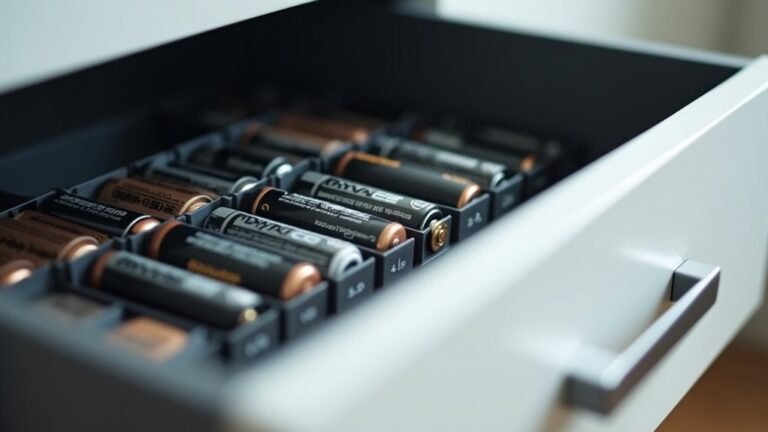
Warm, damp, or sun-baked storage spots can quietly shorten a battery’s life and raise the chance of leakage. You protect your devices best whenever you keep batteries in a cool, dry place with steady ambient humidity. That kind of space helps your battery crew stay reliable and ready. Use original packaging or airtight containers so loose cells stay separated and protected.
| Storage choice | Why it helps |
|---|---|
| Cool shelf | Limits heat stress |
| Dry drawer | Cuts corrosion risk |
| Original box | Prevents contact damage |
| Airtight containers | Shields from moisture |
| Stable room | Reduces aging shifts |
Once you pick a spot, consider calm and consistent, not hot and crowded. A small habit like this keeps your batteries safer, so you can feel prepared whenever you need them most.
Avoid Humid Areas
Humidity can sneak up on batteries and quietly cause trouble, even though they look perfectly fine. You can protect your batteries by storing them in a cool, dry place, away from bathrooms, kitchens, basements, and damp sheds.
Moist air can speed up corrosion, and that tiny shift can lead to leaks later. So, choose a shelf with good ventilation planning, and keep batteries in their original package or a sealed case.
In case your home feels sticky, use a dehumidifier or move the batteries sooner. Also, watch for mold growth near storage spots, since that usually means too much moisture nearby.
Whenever you keep your batteries dry, you help them stay ready, safe, and part of your everyday routine.
Prevent Leaks in Devices
A little care inside the device can stop a small battery problem from turning into a messy repair. Whenever you install batteries, aim for minimal contact with the terminals and seat them firmly. Check that the battery type matches the device, because mixed cells can upset power management and drain unevenly. In case your gadget has been idle, take the batteries out before they age in place. | Check | Why it helps |
| — | — |
|---|---|
| Fresh cells | Leak less often |
| Clean contacts | Keep power steady |
You can also inspect the compartment during battery changes. Look for white dust, sticky marks, or loose springs, then wipe the area with a dry cloth. Whenever you stay on top of these small steps, you help your devices work like they belong in your life, not the repair pile.
Avoid Heat, Moisture, and Damage
Provided that you keep batteries away from heat, moisture, and rough handling, you can lower the chance of leaks by a lot.
You’re part of a smart crowd whenever you store them in a cool, dry spot, not a sunny shelf, hot car, or damp garage. Heat can weaken seals, while moisture can invite corrosion. So, use cases with thermal shielding whenever you need extra protection near warm gear.
Also, choose batteries with strong impact resistance, because drops and bumps can crack the shell and start trouble fast. Whenever you carry spare cells, keep them in a snug holder so they don’t rub together. That small habit helps your batteries stay safer, and it gives you one less thing to worry about.
Remove Dead Batteries Promptly
Whenever a battery starts to fade, you should remove it right away instead of letting it sit in the device.
That quick step helps stop corrosion from spreading and protects the contacts from extra damage.
In case you handle dead batteries promptly, you can save your device from a messy cleanup later.
Prompt Battery Removal
Dead batteries can look harmless, but they often start trouble quietly. Whenever a device starts fading, don’t wait. Your quick removal helps you protect the whole battery compartment and keeps your gear ready for the next use.
In case a battery leaks during an urgent moment, follow emergency removal steps right away so you can stop the damage promptly.
- Turn the device off.
- Open the battery door carefully.
- Take out dead cells at once.
- Store them apart from fresh ones.
You’re not being fussy. You’re looking out for your tools and your space. Check devices that sit idle, too, because old cells can slip past your attention.
A fast habit here makes you part of a smarter, safer group that handles batteries with care.
Prevent Corrosion Damage
A little care now can save you a lot of trouble later. Whenever a battery dies, remove it right away so it can’t leak and stain the compartment. You protect the metal contacts by acting fast, and you keep corrosion from spreading into nearby parts.
In case you spot white crust, rust, or a swollen cell, take it out gently and wipe the area with a dry cloth. Then check the compartment for residue, because leftover grit can keep eating away at surfaces.
Many devices use surface treatments or protective coatings, but those finishes still need your help. Replace dead batteries in pairs whenever needed, and don’t leave empty cells sitting in flashlights, toys, or remotes. That small habit keeps your gear clean, safe, and ready.
Protect Batteries in Long Storage
For long storage, the best thing you can do is give your batteries a calm, stable home before you put them away. You’ll help your gear stay ready, and you’ll feel more at ease, too.
- Place them in a cool, dry drawer, not a hot car or damp garage.
- Keep the original pack or a battery case to prevent bumps and shorting.
- Use long term rotation so older stored batteries get used firstly.
- Try vacuum sealing only provided the maker allows it, since it can limit air and moisture.
In case you store rechargeable cells, leave them near half charge. Also, keep different types separate so they don’t stress each other. With these simple habits, you protect your batteries and keep your whole battery family in good shape.
Spot Early Signs of Leakage
Sometimes, battery leakage starts with tiny clues, so it helps to look closely before a small problem turns into a messy one. You can catch trouble early through checking for early discoloration on the battery case, like dull spots, white film, or odd stains.
Then, feel the battery only whenever it’s out of the device and cool. Tactile abnormalities, such as swelling, a sticky surface, or a rough edge, often mean the cell is changing in ways you shouldn’t ignore.
Also, watch for a sour smell near the compartment, since that can point to leaking chemicals. Should a battery looks or feels off, set it aside and replace it soon. Staying alert helps you protect your gear and feel more confident every day.
Clean Up a Leaking Battery Safely
In case you’ve already spotted signs of leakage, don’t panic, because you can usually handle the mess safely with a calm, careful approach.
To begin, open a window, since ventilation importance helps keep fumes from building up around you. Then put on gloves and, should you be able to, eye protection.
- Remove the battery gently and place it in a bag.
- Sprinkle a small amount of chemical neutralizer, like baking soda for alkaline cells, on the residue.
- Wipe the area with a dry cloth, then a lightly damp one.
- Clean the contacts, and wash your hands well.
Stay with people who can help should you feel unsure, because a steady friend nearby makes the task feel less stressful.
Lastly, keep the device open until everything dries fully, so your space stays safe and ready.
Replace and Recycle Dead Batteries
As soon as a battery runs out, take it out right away so it doesn’t sit there and cause trouble. You protect your device and your peace of mind whenever you swap in fresh, high-quality cells.
Pick the right size, check the date, and use the same type together, so the power stays balanced and the team in your gadget works smoothly. Then follow safe battery disposal rules and use local recycling programs for dead batteries instead of tossing them in the trash.
Should you keep spares, store them in a cool, dry place until you need them. Also, check old devices often, because a forgotten battery can leak whenever you least expect it. A quick replacement now can save you cleanup later.
Frequently Asked Questions
How Often Should I Test Batteries for Leakage Risk?
You should evaluate batteries monthly and also perform inspections each season. Check for swelling, residue, or unusual odors to stay ahead of trouble and keep your devices dependable for your household.
Can Battery Cases Prevent Leaks During Travel?
Yes. Battery cases can help during travel; one study found improper storage causes many leaks. You’ll protect your cells better in padded pouches with ventilation slots, keeping batteries cool, dry, and safely stored with your gear.
Are Rechargeable Batteries Less Likely to Leak?
Yes, you’ll often get better rechargeable reliability; however, chemistry differences matter. You can still reduce leaks through using the right charger, avoiding overcharge, storing them cool and dry, and replacing any damaged cell quickly.
What Should I Do With Swollen Batteries?
A swollen battery is a warning balloon. Remove it, replace it immediately, and dispose of it safely at a battery recycling site. You’re protecting your device and your people, and you’ll keep everyone safer by acting quickly.
How Can I Tell if a Charger Is Damaging Batteries?
You can tell a charger is damaging your batteries if you notice charger overheating, voltage irregularities, swelling, or shorter runtime. You should stop using it, switch chargers, and ensure your devices remain safe together.