Book Appointment Now

Why Laptop Batteries Swell and Become Dangerous
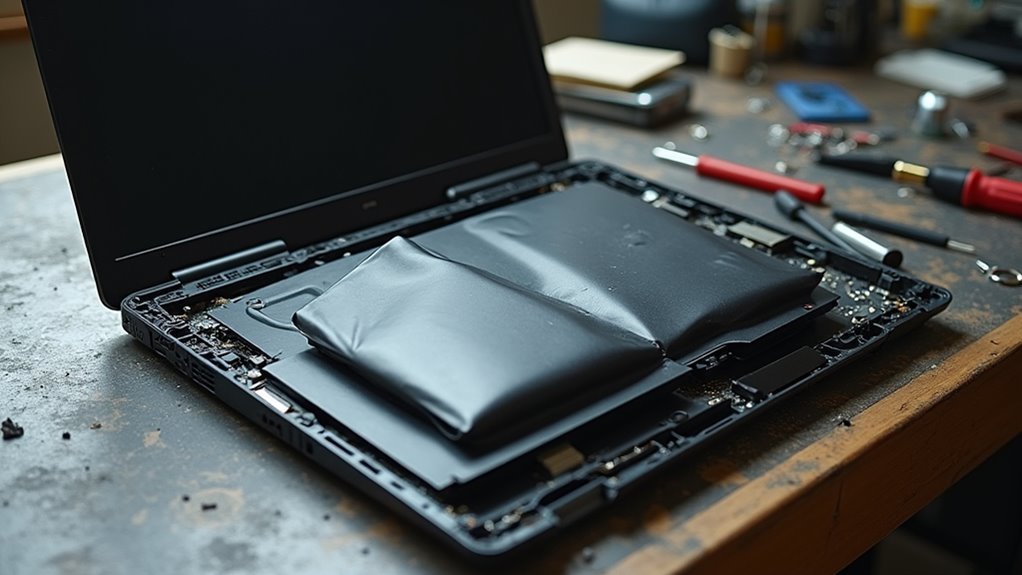
Swollen laptop batteries occur when internal cells degrade and generate gas, causing pressure that warps the casing. Heat, high charge cycles, manufacturing defects, and age accelerate this breakdown. Physical signs include a lifted trackpad, a bulging case, or unexplained warmth. A swollen battery can deform components, reduce cooling, and create a fire or chemical hazard. Spotting these signs early and stopping use immediately protects both device and personal safety.
Why Laptop Batteries Swell?
Whenever a laptop battery swells, it’s usually because gas builds up inside the cells as the battery deteriorates from the inside. You’re not seeing a small cosmetic flaw. You’re seeing cell chemistry struggle.
During battery manufacturing, tiny flaws, heat stress, or aging can leave the internal layers less stable. Then over time, the electrolyte can degrade and release gas. That pressure has nowhere to go, so the pack starts to bulge.
Should you keep charging at high levels or expose your laptop to heat, you can accelerate the damage. So once you notice a swollen battery, trust your instincts and treat it like a real warning sign. You’re better off replacing it than waiting for a worse problem.
What Happens Inside a Swollen Battery?
Inside a swollen battery, the trouble starts at the cell level. You’re seeing gas build up as the electrolyte breaks down and the layers inside the cell lose balance.
That gas pushes harder and harder, raising internal pressure in the sealed pouch or case. As the space tightens, the separator can weaken, and separator rupture might follow, letting nearby layers touch whenever they shouldn’t.
Then the reaction grows, because damaged parts can’t keep the chemistry steady. You could notice the pack puffing out, but the real change is concealed inside. It’s not just a shape issue; it’s a sign that the battery’s inner structure is failing and needs attention from you and your device’s owner.
How Heat Damages Laptop Batteries?
Heat can wear down a laptop battery faster than you could possibly expect, because it speeds up the chemical breakdown happening inside the cells. Whenever you work or charge in a hot room, the battery’s materials age faster, and that stress can push you closer to swelling. You’re not alone in this; many users run into the same problem on warm days.
| Heat Level | What It Does | Risk |
|---|---|---|
| Cool | Keeps cells stable | Low |
| Warm | Raises wear | Medium |
| Hot | Triggers polymer breakdown | High |
| Very hot | Can cause thermal runaway | Severe |
| Trapped heat | Speeds gas buildup | High |
How Overcharging Causes Battery Swelling?
Provided that heat is one reason a battery starts to fail, overcharging often keeps that stress going long after the laptop should’ve stopped charging. When you leave your laptop plugged in at full charge, the battery controllers must work harder to hold the cells at the top of their range. That extra pressure pushes the charge algorithms to keep feeding tiny bursts of energy, and those bursts can raise internal heat.
Over time, the electrolyte starts to decompose and gas builds inside the sealed pack. You mightn’t notice it right away, but the cells begin to puff as pressure rises. So, should your laptop stays warm on the charger for hours, the battery can swell faster. That’s why a smart charging setup helps you feel safer with your device.
How Battery Age Leads to Swelling?
As your laptop battery gets older, its internal materials start to deteriorate, and that weakens the cell from the inside.
You can get gas buildup as the electrolyte decomposes, and that pressure can slowly make the battery swell.
Over time, the battery’s parts expand and fail to stay stable, so swelling becomes more likely.
Battery Chemical Breakdown
Over time, a laptop battery’s inside parts start to wear down, and that slow breakdown is what often leads to swelling. You could notice it once the pack gets hot, loses shape, or pushes against the case.
Inside the cell, electrolyte decomposition weakens the mix that helps power flow, while separator delamination lets layers drift apart and rub where they shouldn’t. That stress makes the battery less stable with each charge.
- You may see the touchpad lift a little.
- Your laptop might run longer on AC than battery.
- You could smell something sharp near a failing pack.
As the chemistry keeps breaking down, your battery can’t stay calm and sealed. It needs replacement, not more time.
Electrolyte Gas Buildup
As a laptop battery gets older, the damage inside it doesn’t just slow it down, it can also start making gas. You mightn’t see it initially, but electrolyte chemistry can break apart and release pressure inside the sealed pack.
That gas has nowhere easy to go, so it builds up and begins to push the battery outward. Heat, long charging, and age all speed this process, and that’s why an old battery can change shape so suddenly.
Should you notice a soft bulge, treat it seriously and act with care. Gentle gas mitigation starts with reducing stress, keeping the laptop cool, and replacing the battery before the swelling grows. You’re not overreacting. You’re protecting your device, your space, and yourself.
Material Expansion Over Time
As a laptop battery gets older, its inside materials don’t stay stable forever, and that slow wear can make the pack swell from within. You couldn’t see it initially, but material fatigue keeps breaking down the layers that hold charge. Then dimensional creep can slowly change the cell’s shape, so pressure starts building in tight spaces.
- You might notice a raised trackpad.
- Your keyboard could feel a little off.
- The battery can seem thicker than before.
As these changes grow, the battery loses its neat fit and pushes against the case. That’s why age matters so much. Whenever you keep using an old pack, tiny shifts add up, and the swelling can become hard to ignore.
Signs Your Laptop Battery Is Swelling
A swollen laptop battery often gives you clear warning signs before it becomes a bigger problem.
You might notice keyboard distortion when keys feel raised, stiff, or uneven.
Next, case warping can make the laptop rock on a flat desk or leave a small gap along the edge.
You could also see the charging indicator acting oddly, such as staying on longer than usual or showing strange changes while the battery is full.
In addition, fan noise can grow louder because the battery shifts parts inside and blocks normal airflow.
You might even feel the trackpad lift slightly.
Should your laptop starts looking or sounding different, trust that feeling. You’re not being fussy, you’re catching an initial clue that deserves your attention.
Why a Swollen Laptop Battery Is Dangerous
A swollen laptop battery can turn from a warning sign into a real danger fast. You’re handling a battery that might overheat, rupture, or even catch fire should the pressure keeps building inside.
It can also damage your laptop’s case, keyboard, and trackpad, so the problem isn’t just about the battery anymore.
Fire And Explosion Risk
Whenever a laptop battery swells, the danger is bigger than a bent case or a sticky trackpad.
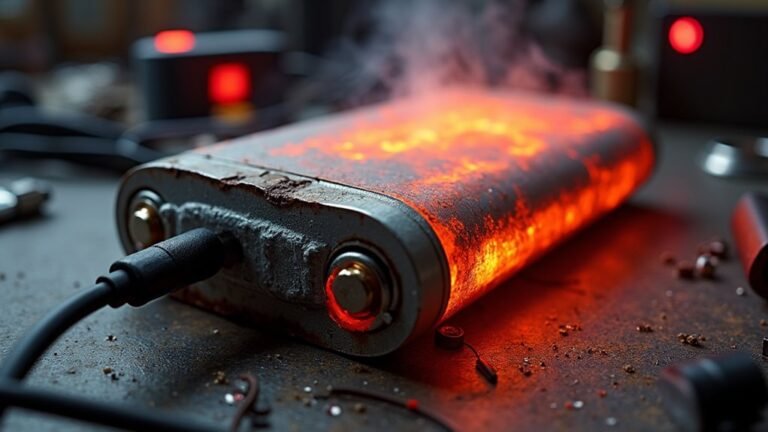
You’re looking at unstable chemistry that can spark thermal runaway, where heat builds fast and the pack can’t calm down.
Should that heat keeps rising, the battery could start rapid venting, pushing out flammable gas and hot particles.
- That’s at which point a small mistake can become a fire.
- A puncture or crush can make the situation worse fast.
- Even a quiet hissing sound can mean trouble nearby.
Were the pack to ignite, flames can spread through your desk, bag, or room.
In rare cases, pressure inside the cell can build so hard that it bursts.
You deserve a safe setup, so treat swelling as a real emergency and keep your distance.
Battery Damage And Failure
Because a swollen battery is already under stress, it can damage your laptop from the inside while also putting you at risk.
Whenever the pack expands, it can push against the trackpad, keyboard, and case, and you might notice parts no longer fit cleanly. That pressure can bend connectors, crack plastic, and weaken delicate wiring.
Inside the battery, cell balancing can fail, so one weak cell strains the rest and speeds failure. In the event manufacturing defects are present, the damage can grow faster and feel sudden.
You could also see heat, odd smells, or power loss. Since the battery is unstable, every charge cycle can exacerbate the problem, and that’s why quick replacement helps protect both your device and your peace of mind.
Can You Keep Using a Swollen Laptop Battery?
Should your laptop battery starts to swell, you shouldn’t keep using it. A swollen pack can press on your keyboard, trackpad, and case, and that strain can grow fast. Even in case your laptop still turns on, you’re only getting a temporary workaround, not a safe fix. You also might face warranty implications were you to keep using a damaged battery after warning signs appear.
- You’re not being dramatic. This is real wear, not a small cosmetic issue.
- In the event the battery bulges, it can worsen with heat and charging.
- Your laptop community would tell you to trust the warning and stop.
Using it longer can raise the chance of leaks, cracks, or fire. Should you care about your device and your peace of mind, treat swelling as a stop sign, not a challenge.
What To Do Right Away if It Swells?
Should your laptop battery start to swell, cut the power and back away from the charger right away. You’re not alone, and this happens to careful people too. Next, isolate device on a hard, clear surface and stop using it.
| Do now | Why it helps |
|---|---|
| Unplug it | Ends charging stress |
| Power it off | Lowers heat |
| Move it | Protects you nearby |
| Keep it cool | Slows damage |
| contact manufacturer | Starts safe next steps |
Don’t press the case, poke it, or keep it in a bag. In the event you smell sweetness, hear hissing, or see more bulge, stay calm and give the laptop space. Then tell others nearby so they don’t touch it accidentally. Save your charger and make a note of the model number. That helps support teams guide you faster.
How to Remove a Swollen Laptop Battery Safely
Initially, you should power down your laptop and unplug it right away, because a swollen battery can get worse while the device stays on.
Then you can remove the battery with care, using slow, steady movements and avoiding any pressure, bending, or puncturing.
In case the battery is built in, stop there and follow the safe removal steps for your model or get help from a trained repair tech.
Power Down And Unplug
Before you touch a swollen laptop battery, power the laptop down fully and unplug it from the charger right away. This immediate shutdown helps cut heat and lowers stress inside the pack.
Next, do cable removal so the laptop isn’t tied to any power source while you plan your next move. You don’t need to rush, and you shouldn’t push or press on the case. Stay calm, because your safety matters more than saving a few minutes.
- Pull the charger from the wall initially.
- Remove any USB devices or docks.
- Move the laptop to a cool, open spot.
When you do this, you protect yourself and the people around you. A swollen battery can feel scary, but you’re not handling it alone. Your careful opening step sets the tone for everything that follows.
Safe Battery Removal Steps
Once you’ve powered the laptop down, the next step is to remove the swollen battery with care so you don’t turn a bad situation into a worse one.
Put on insulated gloves, work on a clean table, and keep the laptop flat. Should the battery be inside a rear panel, remove only the screws you need. Then lift the cover slowly and stop should it resist.
Next, unplug the battery connector by pulling the tab, not the wires. Use a plastic tool to ease the pack free, but never bend or poke it.
Place the battery right into a static free bag and keep it away from heat, kids, and pets. Were you to feel unsure, ask for help from someone trained.
How to Dispose of a Swollen Laptop Battery
Should your laptop battery be swollen, dispose of it carefully because the risk goes beyond a weak battery and into real safety trouble.
You’re not alone in this, and the safest move is to keep it calm, cool, and untouched.
- Place it in a fire-safe container.
- Contact local recycling or certified disposal services.
- Bring it in without tossing it in regular trash.
Next, keep the battery away from sharp objects, metal, and heavy pressure.
Don’t mail it unless the carrier accepts damaged cells, and don’t try to flatten it yourself.
Should you be able, tape the terminals lightly and store it apart from other items until drop-off day.
That small effort helps protect you, your home, and the people who handle it.
How to Prevent Laptop Battery Swelling
You can help stop battery swelling through charging your laptop in a smarter way, not via leaving it plugged in at 100% all day. Keep it cool too, because heat can wear the battery down fast and make swelling more likely.
Also, treat storage and daily use with care, since good airflow, gentle handling, and the right resting habits can protect the battery over time.
Proper Charging Habits
Good charging habits can make a real difference in how long your laptop battery stays healthy, and they can also help keep swelling from showing up too soon. You don’t need perfection, just steady care that fits your day. Keep your charge in the middle range when you can, and let adaptive charging do its job provided your laptop offers it. That feature can slow wear during long plug-in sessions. A quick battery calibration now and then can also help your system read the battery more honestly.
- Unplug after it reaches a comfortable level.
- Avoid sitting at 100% for days.
- Use the charger that came with your laptop.
As you build these habits, you give your battery a calmer routine, and that matters more than you may suppose.
Temperature Control Tips
Keeping your laptop cool is one of the simplest ways to protect the battery from swelling. You belong in a crowd that treats heat like the real enemy, so start with ambient cooling. Set up in a room with steady airflow, and keep vents clear on desks, beds, or laps.
Next, give your laptop regular fan maintenance. Dust can block airflow and trap warmth inside, so clean the vents gently and let the fans breathe.
Also, avoid direct sunlight and hot rooms, since extra heat speeds battery wear. Should your device feels warm, pause and let it rest. A cooler laptop stays kinder to its battery, and that small habit helps you protect both your gear and your peace of mind.
Storage and Usage Care
Whenever it comes to storage and daily use, a little care goes a long way in keeping your laptop battery steady and safe.
You fit in better with your device whenever you treat it kindly.
For long term storage, leave it at a partial charge, around 40% to 60%, and power it down in a cool, dry place.
In case you use it daily, avoid sitting at 100% for hours, and unplug once it’s ready.
- Keep vents open on desks, not blankets.
- Charge in short sessions whenever possible.
- Check for odd warmth or a soft bulge.
These habits help your battery stay calm and lower stress inside the cells.
A little routine now can save you from a bigger headache later, and perhaps a wobbly touchpad too.
Charging Habits That Protect Battery Health
Usually, the safest charging habit is the one that takes pressure off the battery instead of constantly pushing it to the edge.
You can do that through unplugging before your laptop sits at 100% for hours, especially should you’re near a desk all day. Many devices offer adaptive charging, which slows the last stretch and helps ease wear.
In case your battery gauge seems off, battery calibration can help your laptop read charge more accurately.
You should also keep the charger off soft blankets, because trapped heat can join the stress party nobody asked for.
Try shorter top-ups through the day, and avoid full drains unless your laptop maker suggests it.
Small, steady habits help you and your battery stay on the same team.
When to Replace Your Laptop Battery
Should your laptop battery no longer hold a charge the way it used to, that’s more than a small annoyance, and it’s perhaps your cue to ponder replacement. You’re not being picky. You’re protecting your routine, your data, and your peace of mind.
- In case your battery dies fast after a full charge, check replacement timing.
- In the event your laptop shuts off at 20 percent or less, watch the capacity thresholds.
- Should the case feel warm, swollen, or uneven, act fast and stop using it.
These signs often show up together, and they usually mean the battery’s wear has moved past normal aging. So, don’t wait for a surprise shutdown during a busy day. In case your laptop starts asking for the charger like a clingy friend, it’s probably time to replace the battery and keep your setup safe and steady.
Frequently Asked Questions
Can a Swollen Battery Damage My Laptop Screen?
Yes, it can. About 1 in 3 swollen batteries pushes upward enough to cause screen pressure and hinge distortion, so you should power down, avoid closing the laptop, and replace the battery soon.
Does Battery Swelling Happen in All Laptop Brands?
No, you will not see battery swelling in all laptop brands. Brand differences affect design and quality, but heat, age, and charging habits matter most. Check warranty implications, since some makers cover swelling related failures differently.
Is a Slightly Swollen Battery Still Safe During Transport?
No, you should not treat a swollen battery as safe for transport. If you must move it, follow airline rules and use proper packaging precautions. Better safe than sorry; replace it as soon as possible to protect yourself and others.
Can Factory Defects Cause Laptop Battery Swelling?
Yes, factory defects can cause laptop battery swelling. Manufacturing contamination or weld failure can allow gas to build up inside the cells. If you notice bulging, stop using the laptop and replace the battery promptly.
Are Swollen Lithium-Polymer Batteries More Common Than Lithium-Ion?
Usually, yes. You’ll see swelling more often in lithium polymer packs because their pouch design is more vulnerable. But age related degradation and manufacturing variability matter too, so your battery’s condition and quality shape the risk.